compare_arrows
Loading...
Loading...
Compare lists online with our free list diff checker. Easily compare two lists, spot differences, and analyze data like followers and following lists.
Removes "Following" & metadata lines automatically.
Smartly separate usernames from dates/times.
Ready-to-use output for instant comparison.
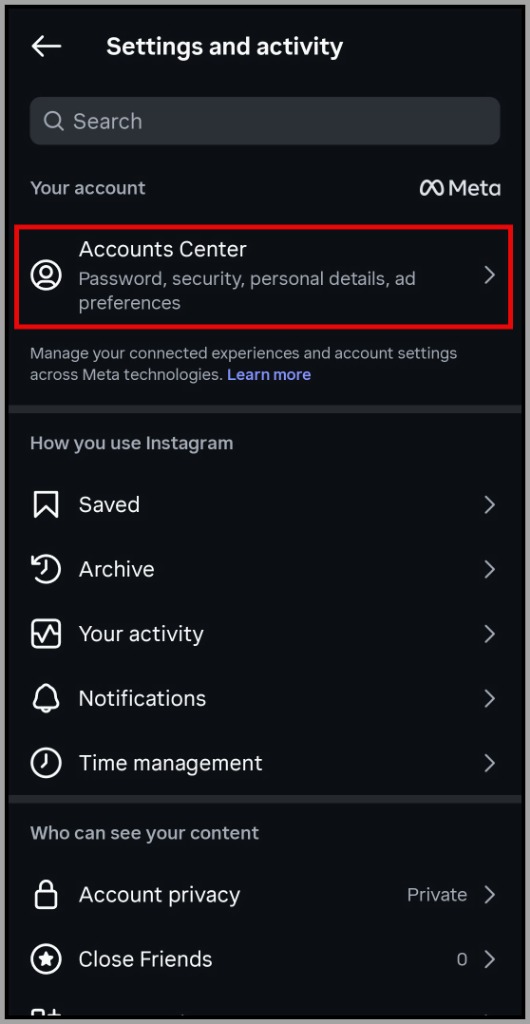
Go to Instagram Settings → Accounts Center
Select "Your information and permissions"
Click "Export your information"
Tap "Create export"
Choose "Export to device"
Select your Instagram profile
Tap "Customise information and uncheck all the options"
Into connections section only select "Followers and following" then tap Save
Select date range to "All time" and verify format is "HTML" then tap "Start export"
When ready (it takes 5-10 minutes), tap "Download"
Unzip the file to find `followers_1.html` and `following.html`
Upload followers_1.html to List A and following.html to List B then click "Compare Lists"
Easily compare two lists of any size. Our tool processes your data instantly in your browser, providing immediate results for quick analysis without any server delays.
Use our advanced options like Case Sensitivity, Ignore Spaces, and Fuzzy Matching for precise comparisons. Perfect for clean data, code diffs, or finding near-matches in user lists.
Get comprehensive comparison results including items unique to each list, common items (intersection), and a complete union. Visualize the differences with our interactive Venn Diagram.
Your data never leaves your device. Unlike other tools, we use local browser processing to ensure your sensitive lists, emails, or user data remain 100% private and secure.
Powered by our advanced ListDiff algorithm, we ensure 100% accuracy in detecting every difference. Whether it is code, unstructured text, or data arrays, our engine identifies unique and common items with mathematical precision.
The ultimate tool for Instagram growth. Upload your followers and following HTML files to instantly spot unfollowers. Our smart filters automatically clean dates, headers, and metadata to give you a clean list of who is not following you back.
Effortlessly compare spreadsheet columns or database exports. Identify new entries, spot missing data, and merge duplicates for clean, accurate reporting.
Keep your subscriber lists healthy. Instantly isolate unsubscribes, find active overlaps between campaigns, and remove invalid duplicate emails.
Essential for developers. Compare configuration files, dependencies, or variable lists between environments (Dev vs. Prod) to prevent deployment errors.
Reconcile inventory fast. Compare supplier lists against your warehouse stock to track SKUs, identify out-of-stock items, and prevent over-ordering.
Dominate search results. Compare your keyword strategy against competitors to find missing opportunities, common terms, and unique content gaps.
Automate your quality assurance. Validate data migrations by verifying that source and destination record IDs match perfectly, ensuring zero data loss.
Our tool is packed with powerful filters to handle any data format. Here is how each improved option helps you get the perfect result.
Specifically designed for social media managers. It automatically detects and removes metadata like "Following", "Followers", dates, and timestamps (e.g., "Jan 15, 2026"), leaving you with a clean list of usernames for accurate follower comparison.
By default, our tool treats "apple" and "Apple" as the same item. Enable this option if you need precision matching where capitalization matters, such as when comparing passwords, code variables, or case sensitive IDs.
Messy data often has hidden spaces. "Ignore Begin/End Spaces" trims padding, while "Ignore Extra Spaces" normalizes double spaces into single ones. Essential for cleaning up copy-pasted data from PDFs or websites.
Our standout feature. Unlike standard exact matching, Fuzzy Match identifies items that are "similar enough." Perfect for finding typos (e.g., "John Doe" vs "John Doe") or minor spelling variations in large datasets.
Working with data exports? "Ignore Leading Zeroes" treats "007" and "7" as identical. "Line Numbered" strips prefixes like "1. Item" or "2) Item" so you can compare the actual content without reformatting.
Don't just compare—organize. Sort your output A-Z, Z-A, or by length. You can also instantly convert results to UPPERCASE, lowercase, or Title Case to standardize your final list for reporting.
Our tool uses advanced local algorithms to instantly analyze two datasets directly in your browser. Simply paste your text or drag & drop files, and it automatically highlights unique items, duplicates, and intersections (common items) without sending any data to a server.
You can compare virtually any text-based data! This includes email marketing lists, software code snippets, database IDs, e-commerce product SKUs, inventory spreadsheets, or even simple student attendance lists.
Yes, 100% secure. All comparisons happen locally in your browser. No data is ever sent to our servers, ensuring your lists remain completely confidential.
Yes, our list comparison tool is completely free with no hidden charges, subscriptions, or daily limits. Compare as many lists as you need.
Absolutely, you can drag and drop .csv, .xlsx, .json, and .txt files directly into the input boxes, or use the upload button to select them from your device.
You can compare thousands of lines instantly. The only limit is your browser's memory, which allows for handling massive lists with ease.
Yes! Our tool is fully responsive and optimized for mobile devices, making it easy to clean, sort, and compare lists directly from your smartphone or tablet.